 Ujaval Gandhi
ხაზების სიგრძის გამოთვლა და სტატისტიკა (QGIS3)
QGIS-ს გააჩნია ჩაშენებული ფუნქციები და ალგორითმები ობიექტის გეომეტრიაზე დაფუძნებული სხვადასხვა მახასიათებლის გამოსათვლელად — როგორიცაა სიგრძე, ფართობი, პერიმეტრი და ა.შ. ეს სახელმძღვანელო გიჩვენებთ, როგორ გამოიყენოთ ხელსაწყო Add geometry attributes (გეომეტრიის ატრიბუტების დამატება), რათა დაამატოთ სვეტი თითოეული ობიექტის სიგრძის აღმნიშვნელი მნიშვნელობით.
ამოცანის მიმოხილვა
ჩრდილოეთ ამერიკის რკინიგზის ხაზოვანი (polyline) ფენის საფუძველზე, ჩვენ დავადგენთ რკინიგზის საერთო სიგრძეს ამერიკის შეერთებულ შტატებში.
სხვა უნარები, რომლებსაც ისწავლით
ობიექტების გაფილტვრა გამოსახულებების(expressions) გამოყენებით.
ვიყენებთ Statistics პანელს სვეტების სტატისტიკის გამოსათვლელად და სანახავად.
მონაცემების მიღება
Natural Earth-ს გააჩნია რკინიგზის საჯარო დომენის (public domain) მონაცემთა ნაკრები.
ჩამოტვირთეთ North America supplement zip ფაილი პორტალიდან.
მეტი მოხერხებისთვის, შეგიძლიათ მონაცემთა ნაკრების ასლი პირდაპირ ქვემოთ მოცემული ბმულიდან ჩამოტვირთოთ:
ne_10m_railroads_north_america..zip
მონაცემთა პირველწყარო [NATURALEARTH]
მოქმედებათა თანმიმდევრობა
მოძებნეთ ჩამოტვირთული
ne_10m_railroads_north_america.zipფაილი Browser პანელში და გაშალეთ იგი. გადაათრიეთne_10m_railroads_north_america.shpფაილი სამუშაო არეზე (canvas).
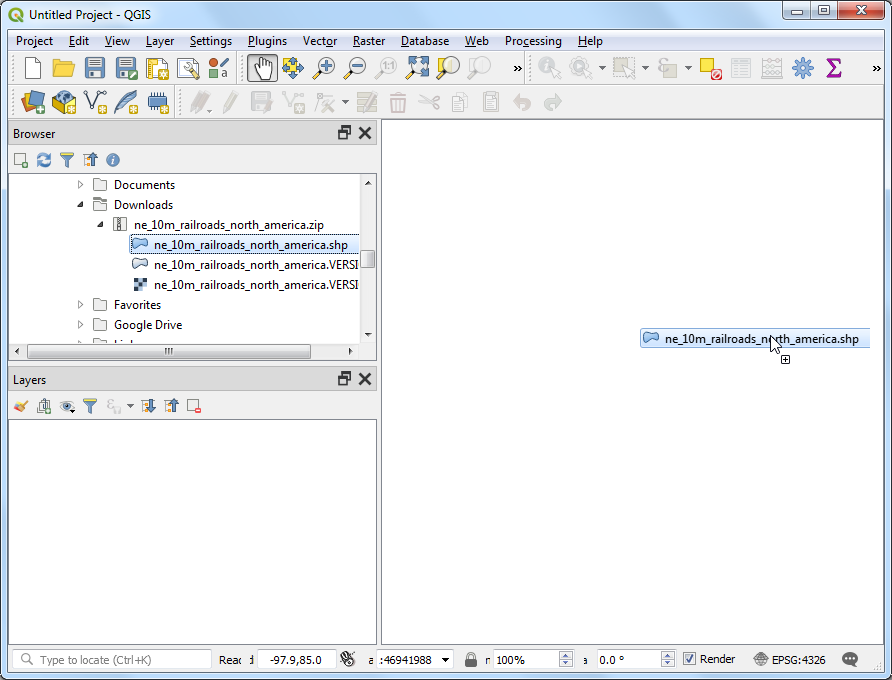
თქვენ დაინახავთ Layers პანელში ჩატვირთულ ახალ ფენას ne_10m_railroads_north_america. ფენას აქვს მთელი ჩრდილოეთ ამერიკის რკინიგზის აღმნიშვნელი ხაზები. ახლა, მოდით გამოვთვალოთ თითოეული ხაზოვანი ობიექტის სიგრძე. გადადით :menuselection:Processing --> Toolbox (დამუშავება --> ხელსაწყოების ყუთი) მენიუში.
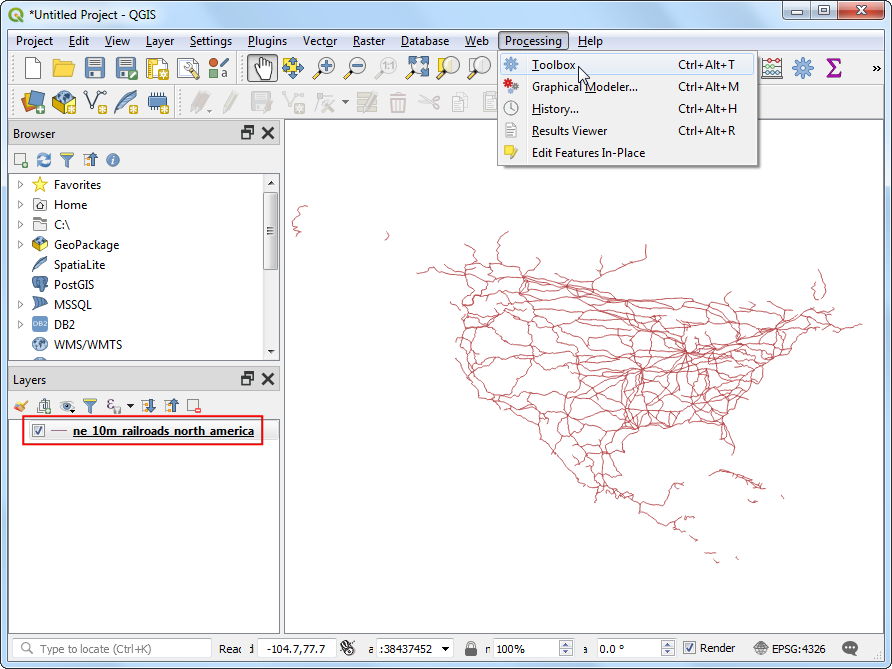
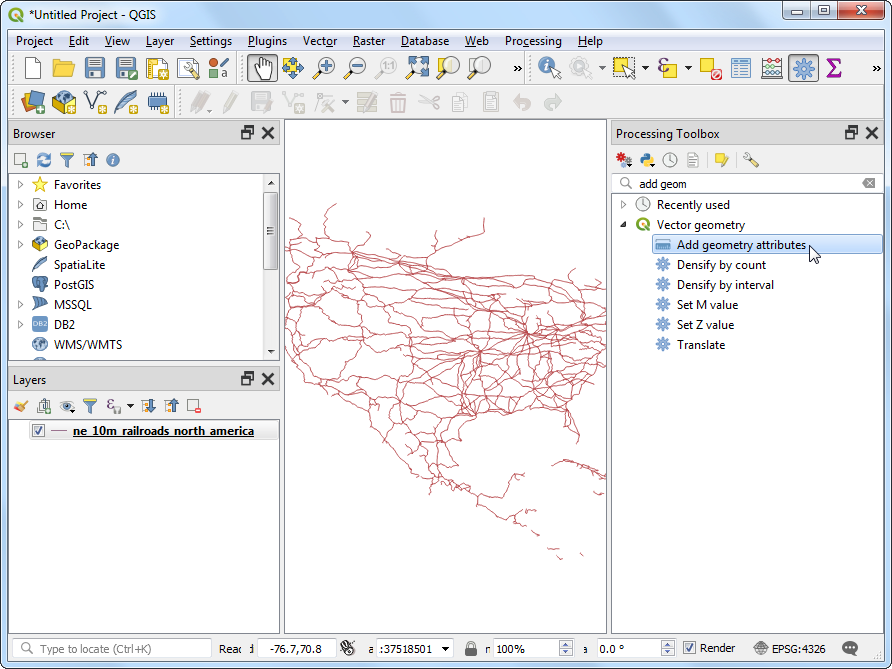
მოძებნეთ და იპოვეთ (ვექტორული გეომეტრია --> გეომეტრიის ატრიბუტების დამატება) ალგორითმი. ორჯერ აწკაპეთ მის გასაშვებად.
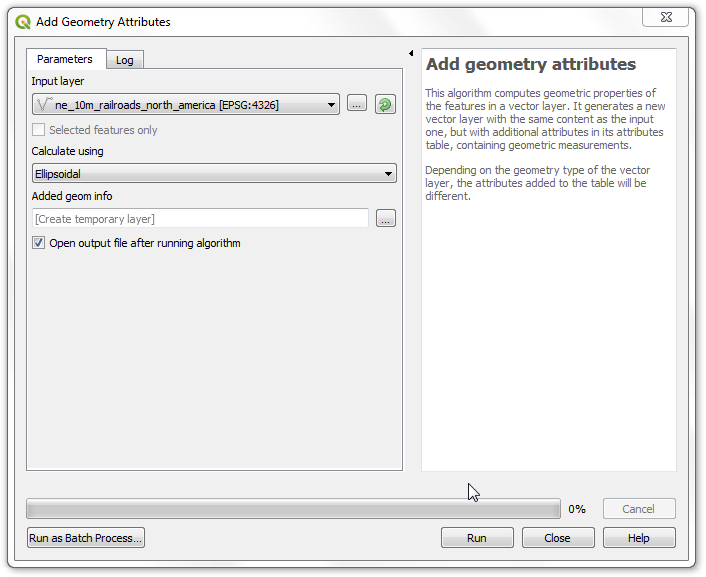
Add Geometry Attributes (გეომეტრიის ატრიბუტების დამატება) ფანჯარაში, Input layer (შესატანი ფენა) ველში აირჩიეთ ne_10m_railroads_north_america. შესატანი ფენის კოორდინატთა სისტემა (CRS) არის EPSG:4326 WGS84. ეს არის გეოგრაფიული CRS, სადაც კოორდინატებად გამოყენებულია განედი და გრძედი, ელიფსოიდად — WGS84, ხოლო ერთეულებად — გრადუსები. ვინაიდან განედსა და გრძედს არ გააჩნია სტანდარტული სიგრძე, თქვენ ვერ შეძლებთ მანძილების ან ფართობების ზუსტად გაზომვას სიბრტყული გეომეტრიის ფუნქციების გამოყენებით. საბედნიეროდ, QGIS გვთავაზობს მანძილების გამოთვლის უკეთეს გზას ელიფსოიდური გეომეტრიის გამოყენებით, რაც ყველაზე ზუსტი მეთოდია მსგავსი დიდი ფართობის მქონე ფენებისთვის. Calculate using (გამოთვლის მეთოდი) პარამეტრში აირჩიეთ Ellipsoidal. დააჭირეთ Run (გაშვება). პროცესის დასრულების შემდეგ აწკაპეთ Close (დახურვა).
ნოტი
თუ თქვენი ფენა არის პროექცირებულ საკოორდინატო სისტემაში (Projected CRS), გამოთვლისთვის შეგიძლიათ აირჩიოთ Layer CRS პარამეტრი. ლოკალური ან რეგიონული გეგმილი კოორდინატთა სისტემები შექმნილია მათი ინტერესის არეალში დამახინჯებების მინიმუმამდე დასაყვანად, შესაბამისად, უფრო ზუსტია მსგავსი გამოთვლებისთვის. Ellipsoidal (ელიფსოიდური) მეთოდი სასურველია გეოგრაფიულ კოორდინატთა სისტემაში (მაგ. განედი/გრძედი) არსებული ფენებისთვის. ელიფსოიდური სიგრძის გამოთვლის ნაგულისხმევი ერთეულია მეტრი და მისი შეცვლა შესაძლებელია მენიუში: :menuselection:Project --> Properties --> General (პროექტი --> თვისებები --> ზოგადი).
You will see a new layer
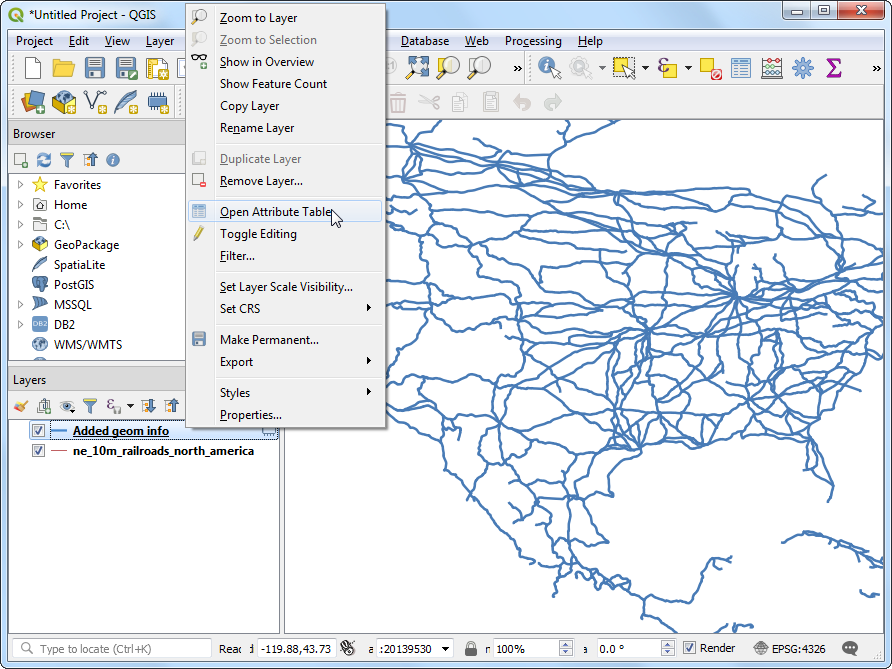
Added geom infoloaded in the Layers panel. This is a copy of the input layer with a new column added for distance. Right-click theAdded geom infolayer and select Open Attribute Table.
ნოტი
The Add Geometry Attribute tool adds different set of attributes depending on whether the input layer is points, lines or polygons. See QGIS documentation for more details.
In the Attribute Table, you will see a new column called length. This contains the length of each line feature in meters. Also note that the sov_a3 attribute which contains the country code for each feature. Close the Attribute Table window.
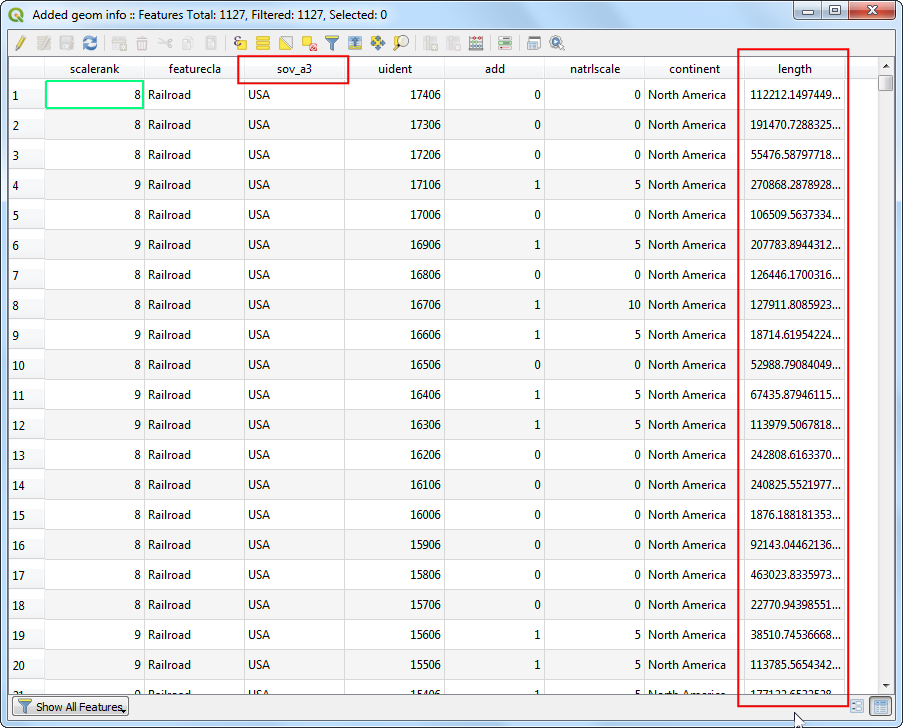
Now that we have lengths of individual railroad line segments, we can add them up to find the total length of railroads. But as the problem statement demands we need total railroad length in the United States, we must use only the segments contained within USA. We can use the country code value in the sov_a3 column to filter the layer. Right-click the
Added geom infolayer and select Filter.
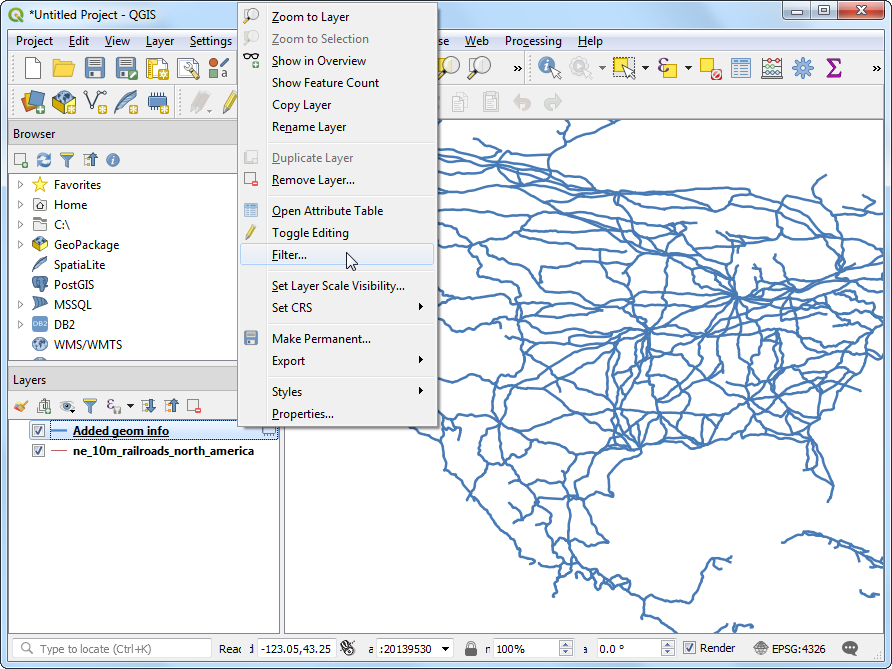
In the Query Builder dialog, enter the following expression and click OK.
"sov_a3" = 'USA'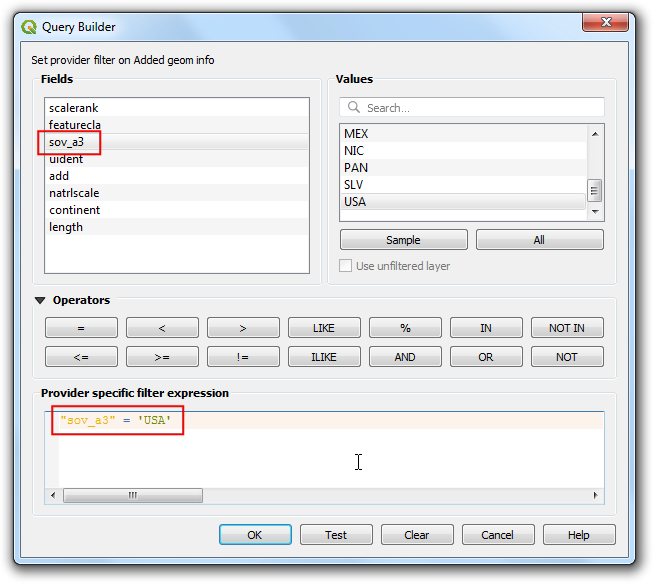
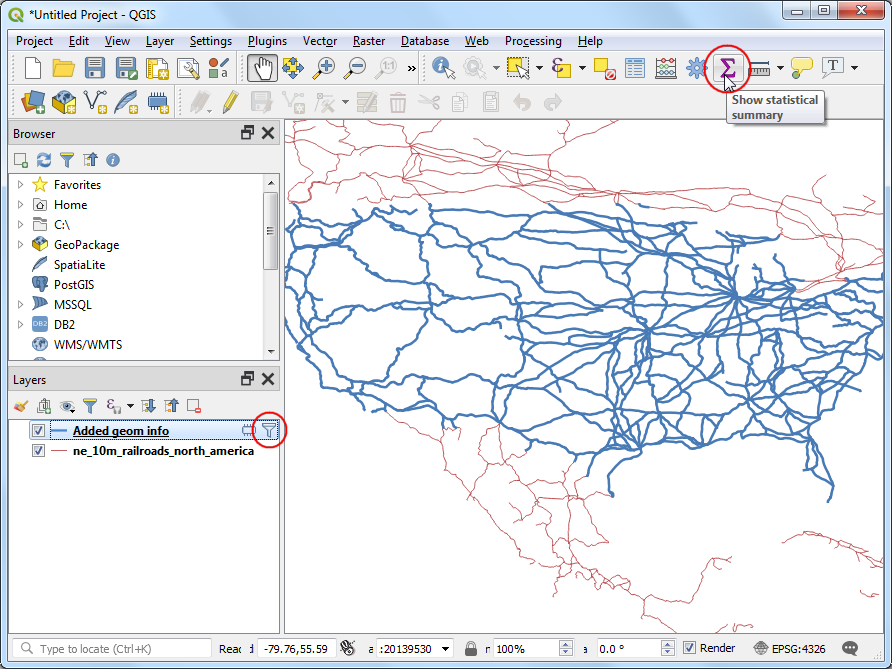
You will see a Filter icon appear next to the
Added geom infolayer in the Layers panel indicating that a filter is applied to the layer. You can also visually confirm that the layer now contains line segments only for United States. Now we are ready to calculate the sum. Click the Show statistical summary button on the Attributes Toolbar.
A new Statistics panel will open. Select
Added geom infolayer andlengthcolumn.
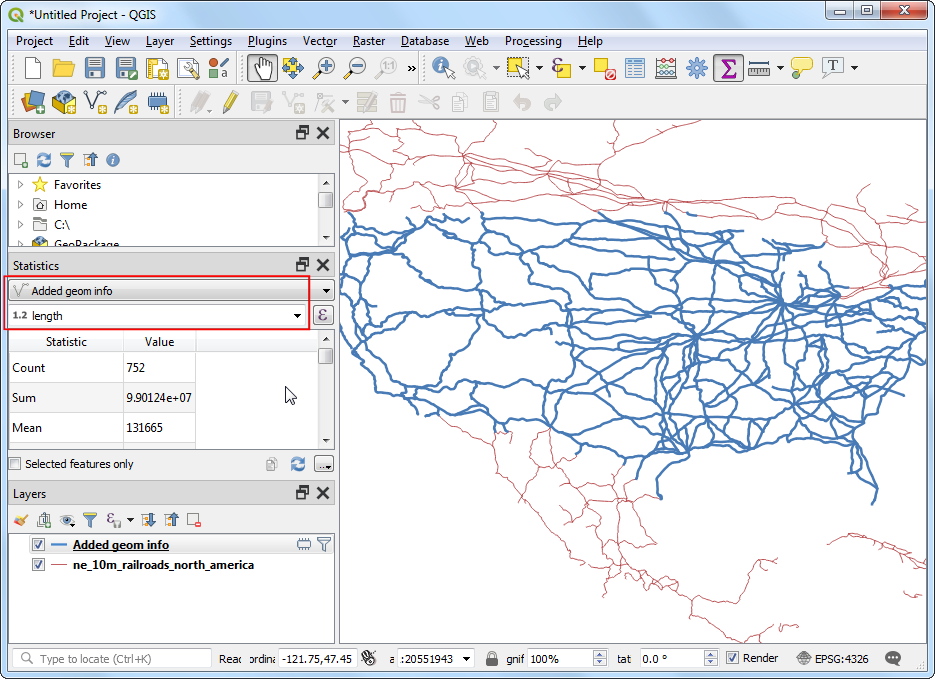
You will see various statistics displayed in the panel. The unit of the statistics is the same as the units of
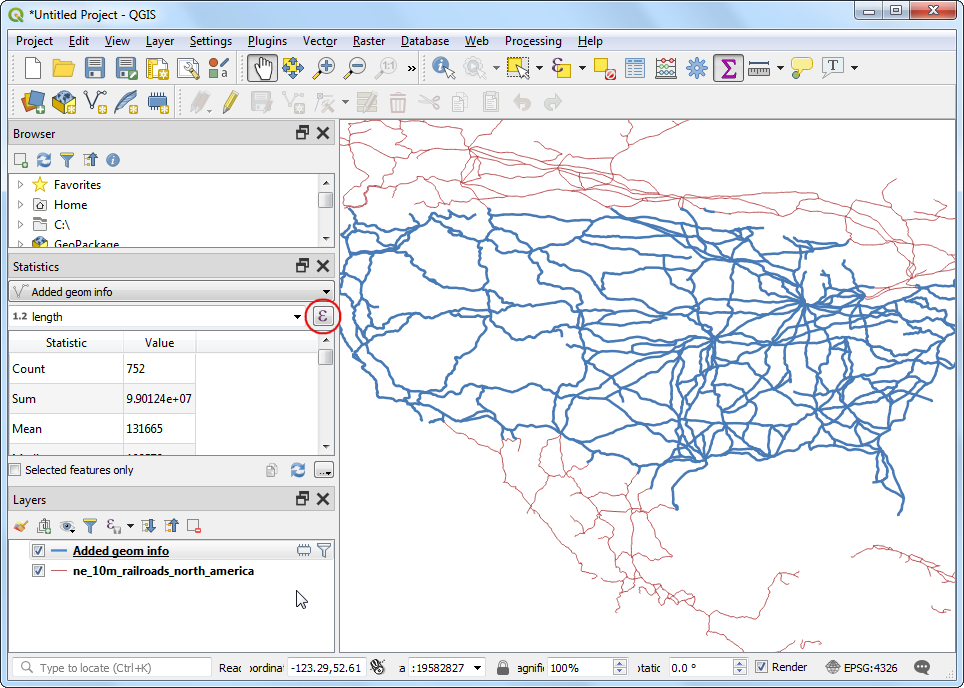
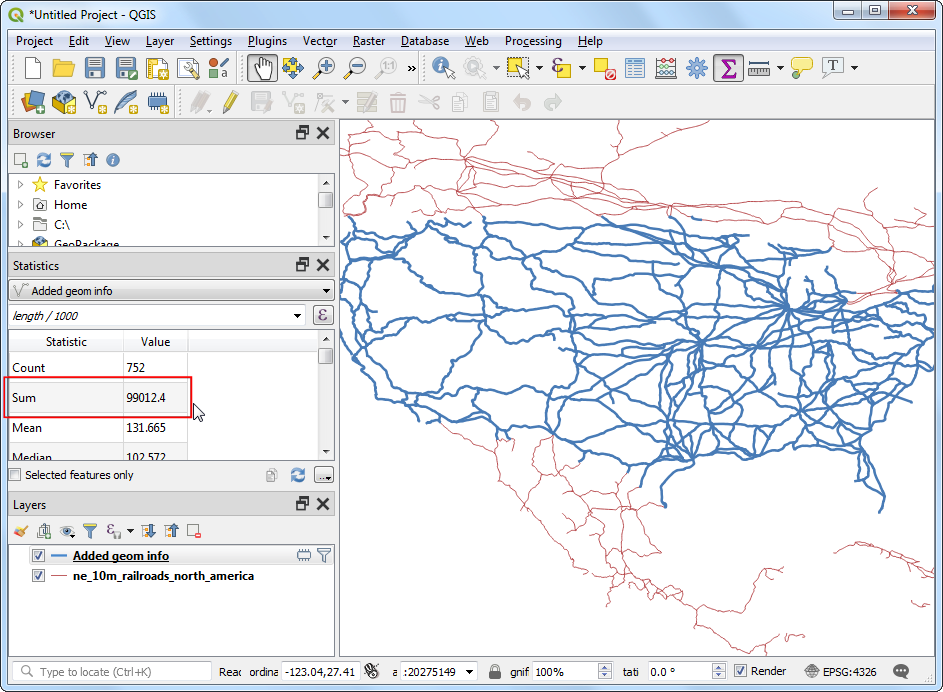
lengthcolumn - meters. Let's change the computation to use kilometers instead. Click the Expression icon next to the fields drop-down menu in the Statistics panel.
Enter the following expression in the Expression Dialog that converts the length to kilometers.
length / 1000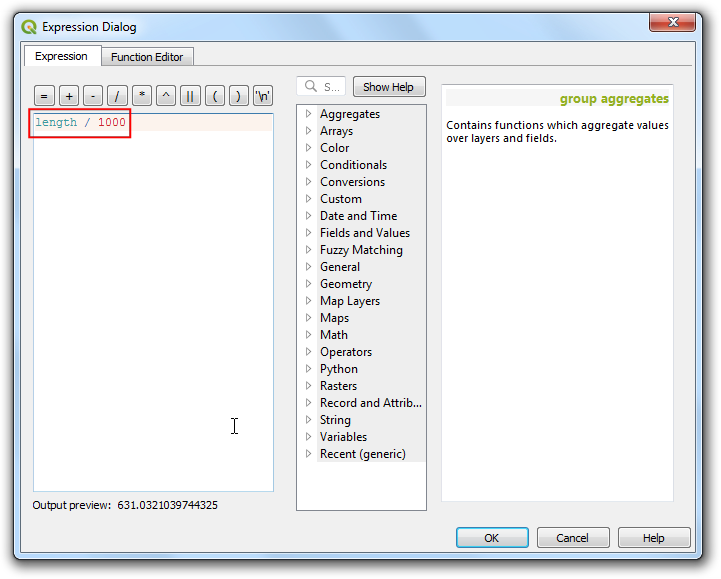
The Sum value displayed is the total length of railroads in USA.
If you want to give feedback or share your experience with this tutorial, please comment below. (requires GitHub account)